
Citrix Access Gateway – Configure Failover

In this post I’m going to show you how to setup and test failover for Citrix Access Gateway. In this example I’m using the default network interface for Applicane Failover, but it’s recommended to add a dedicated interface.

When you’re setting up Failover the Citrix Access Gateway both appliances new to be on the same version. You also need to make sure that both applicances have matching passwords since those aren’t replicated.

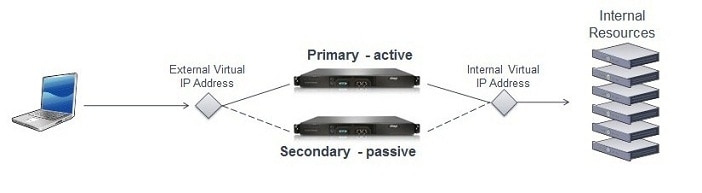
With two appliances joined as a failover pair, users connect to a shared virtual IP address instead of the real eth0 or eth1 IP address. You define one virtual IP address that users will connect to and another virtual IP address which Citrix Access Gateway will use when communicating with back-end resources. The internal and external virtual IP address can both be the same as in our example.

Continue Reading

PHD Virtual Backup and Exporter

PHD Virtual Backup is a fantastic piece of software that I highly recommend. I’ve been running this backup solution in my xenapptraining lab since June 2011 and it has saved my ass many times. It also made it very easy for me to setup my new lab in Brasil – Citrix XenServer The Optimal Cheap Home Lab.

Since then the PHD Virtual team have added more features and better performance so in this post I’ll show you how to upgrade your PHD Virtual Appliance to the latest version and configure the new PHD Virtual Export feature. If you’re new to PHD Virtual Backup you can check out this video taken from our xenapptraining members area.

Continue Reading

Free SMS 2-Factor Token for Citrix Web Interface 5.4

There are many SMS 2-factor solutions for Citrix Web Interface, but only one of them are free. This awesome add on has been created by Claus Isager and there exist many blog posts dating back to 2007. Since then many things have change e.g. the release of Citrix Web Interface 5.4 and the fact that more and more companies are running Windows 2008 R2.

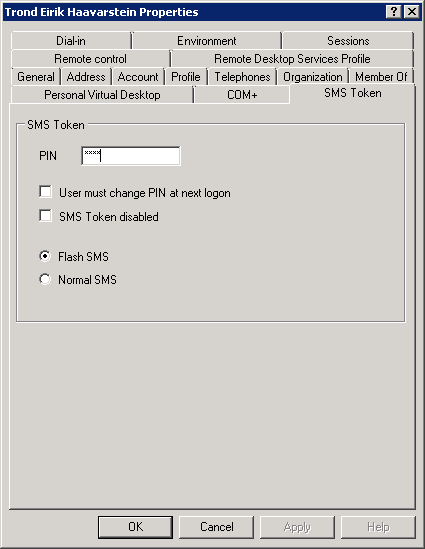
So in this blog post we’ll show you how to install and configure this solution for the x64 platform. First you need to download the source files from Claus Isager web site and make sure you have .NET Framework 3.5 on the domain controller(s) you want to use to manage this SMS 2-factor solution.

Continue Reading